CodeInstances Signs Runs, So You Can Check Who Kept One and That Nothing Changed
CodeInstances v0.7.0 adds signing. Every instance already carried an id, the SHA-256 of its contents, so verify could tell you a file had been edited. What it couldn’t tell you is who made the file in the first place. Anyone can change a run and write a fresh id. Now a run can carry a signature, and verify -trust checks it against keys you’ve decided to trust.
That matters when a run is evidence. A CI job says the tests passed, an AI agent says what it did and what came back, a bug report says this is what happened. With a signed instance the person reading it doesn’t have to take the file’s word for it. They check the key.
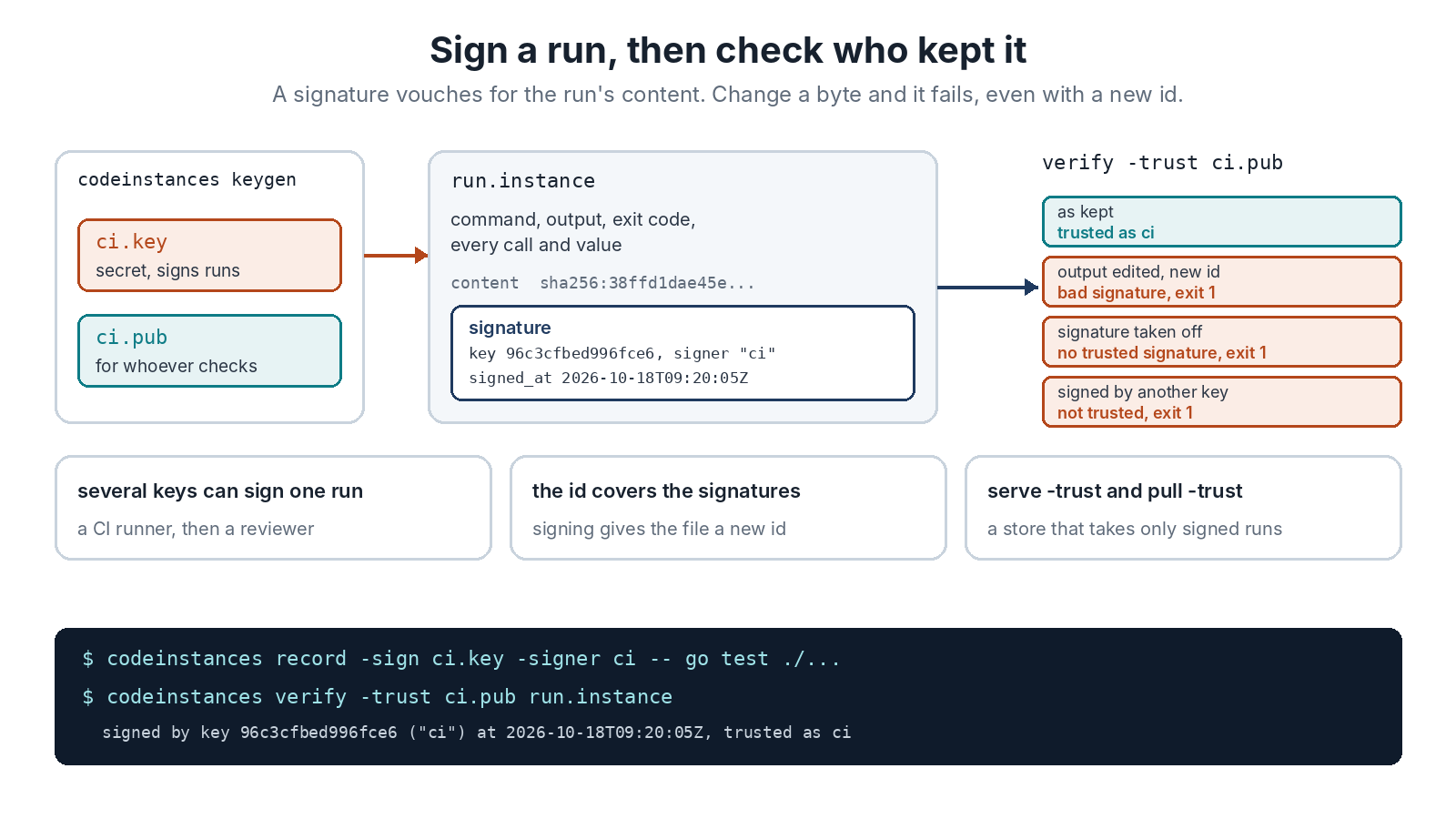
Three commands do it. codeinstances keygen -o ci writes a key pair: ci.key, which stays with you, and ci.pub, one line you hand to whoever checks your runs. codeinstances sign -key ci.key run.instance signs a run you already have, or record -sign ci.key signs as it keeps it. And codeinstances verify -trust ci.pub run.instance exits 0 only when that key signed this exact run.
What Gets Signed
A signature covers the run’s content id: the id the file had before anyone signed it. So several keys can sign the same run, a CI runner and then the person who reviewed it, without getting in each other’s way. The file’s own id covers the signatures too, which means signing gives the file a new id, and sign prints both. Older versions of CodeInstances still read signed files. They just don’t check the signatures.
Every command that reads a file checks its signatures now. Change a byte of output, write a matching id, and the file is refused on the signature instead. A store started with serve -trust ci.pub takes only uploads signed by that key, and pull -trust won’t keep a run nobody you trust signed. The format spells out the exact bytes that get signed, with a signed example file so other tools can check their own code against it.
What a Signature Doesn’t Prove
It proves that whoever holds the key signed this content. The signer name and the time are their say-so, since there’s no timestamp authority and clocks can be set to anything. There’s no revocation either: a trust file is just a list, and a key leaves it when you delete its line. A signature can also be taken off a file, which leaves a valid unsigned run, so only a reader that asks for a trusted signature notices it’s gone.
And a signature vouches for what was kept, not for how. record -sign runs the program as you, so the program could read the key. When the program shouldn’t be able to sign, an AI agent say, record without the key and sign in a separate step afterwards. The CI example does it that way.
Tested
110 Go tests pass, and the race detector finds nothing. The demo has 30 checks now. It makes a key, signs a run and checks verify -trust takes it. Then it checks that an unsigned run and a key it wasn’t given are refused, that an edited run with a freshly computed id fails on its signature, and that a store with the key as trusted takes the signed run and turns the unsigned one away. Signing took 6 ms and checking 3 ms. An independent review tried to forge a trusted signature and couldn’t. It did find that a signature could be spelled more than one way, which gave a signed file new bytes without the key. It also found that sign could drop parts of a file written by a later version, and that the first CI example left the key where the tests could read it. All three are fixed and tested. The result files are in test/results.
That’s seven of the eight steps on the plan. The last one, running instances on demand, is optional and the heaviest. Download v0.7.0, and the reference has every flag.