CodeInstances Runs Kept Instances on Demand, From a Store You Control
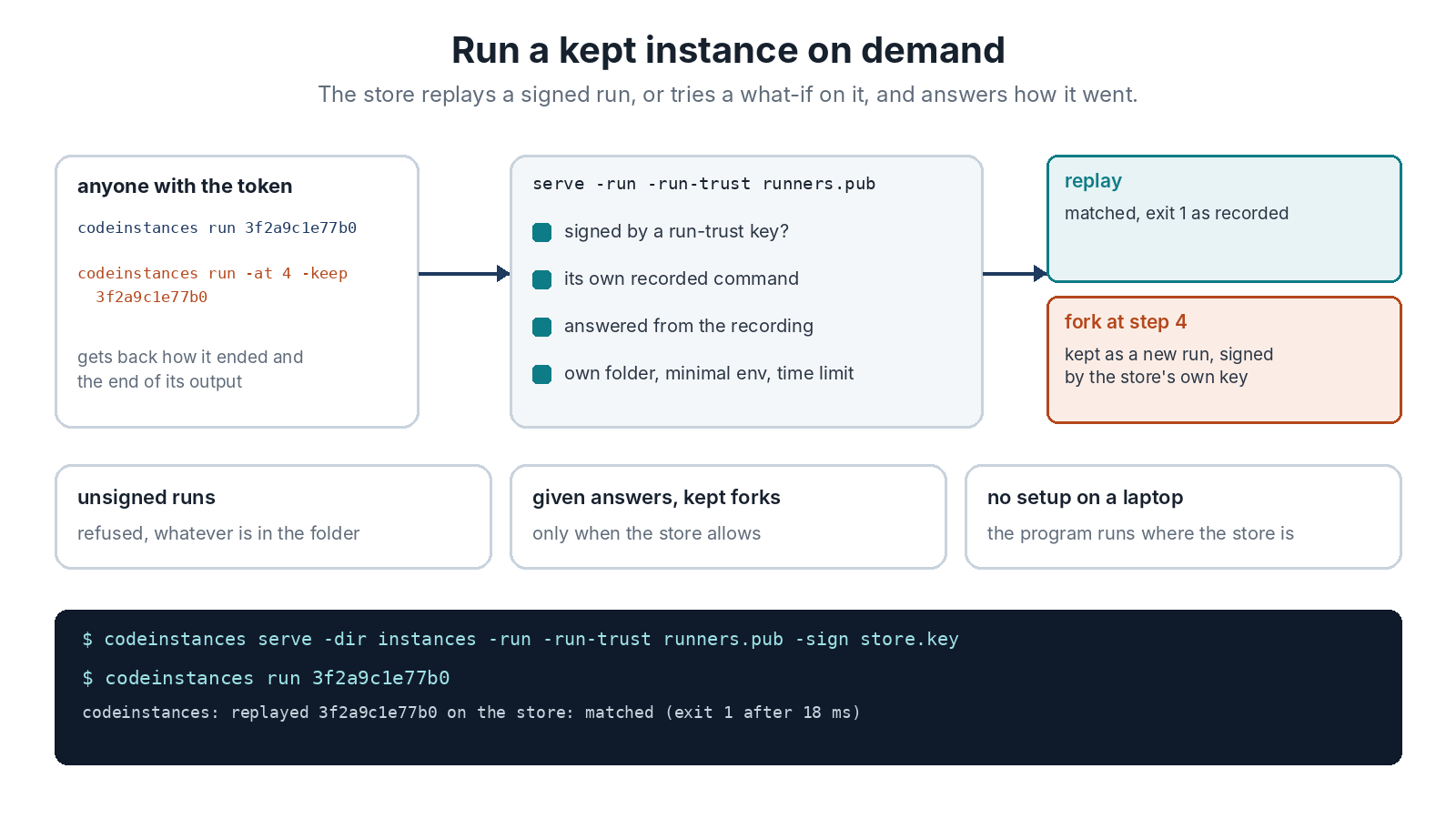
CodeInstances v0.8.0 lets a store run what it keeps. Start it with serve -run, and anyone with the store’s token can ask it to replay a run, or fork one at a step, and get back how it went. codeinstances run 3f2a9c1e77b0 replays that run on the store. codeinstances run -at 4 -o what-if.instance 3f2a9c1e77b0 forks it at call 4 there and downloads the result.
Think of a function service, where code sits ready and a request runs it. Here the kept run is the function. A replay answers whether the program, as installed on that machine, still does what the run did. A fork tries the run again from a step, and nobody has to set the program up on their own laptop to do it. Every run is answered from the recording, so HTTP calls made through the proxy settings never go out.
That’s the whole feature. The rest of this post is about the rules, because a server that runs commands on request is something to be careful with.
What the Store Will Run
Only instances signed by a key in -run-trust, checked at every run. That list is kept apart from -trust, which says whose uploads the store takes, because “I know who kept this” isn’t the same as “this is fine to run on this machine”. The store runs the command the instance recorded. A request picks which run, and for a fork the step. It can’t change the command.
A fork request can give an answer at the step, a 503 say, only if the store was started with -run-answers. It’s off by default for a good reason. An answer is input the program acts on. A signed run that downloads a script and runs it would run whatever answer it was handed. The first review of this release found exactly that.
Forks are kept only when you ask, up to -max-kept of them. If the store has a signing key of its own, it signs what it keeps, a signature that means “ran here, with these answers”. The store refuses to start if that key is also a trusted one, and it never runs a fork only its own key signed. Otherwise anyone with the token could turn their chosen answers into trusted runs.
How It Stays Contained
Each run starts in a fresh empty folder, from a minimal environment, with a time limit and one run at a time by default. On Linux and macOS a run gets a process group of its own, and the whole group is stopped when the run ends, times out, loses its client, or the store shuts down. On Linux the store also makes itself unreadable to the programs it runs, so they can’t pull its token out of /proc.
What it can’t do is make the programs it runs into a different user. They run as the store’s user, and they can read and change what that user can. So give the store a user of its own, or a container, and keep its key, its token and its trust files out of that user’s reach. The README spells out every rule and every limit.
Tested
118 Go tests pass, and the race detector finds nothing. The demo has 33 checks now. With a store running instances, it replays a signed run there and checks it matches, which took 22 ms. It tries a what-if fork with the order accepted and checks the program gets as far as a call the original run never made, which took 50 ms. It also checks that the store won’t run an unsigned run.
Two independent reviews went over this release before it went out. The first found the answer problem above. It also found that a program could read the store’s token through /proc, that the store’s own key could make it a signing oracle, that kept forks had no limit, and that processes a run started could outlive it. The second checked those fixes and found one regression: stopping the store with Ctrl-C left its runs running. Everything they found is fixed and tested. The result files are in test/results.
That’s the last item on the plan. Every run is now an object you can keep, replay, compare, shrink, test, group, share, fork, sign and run on demand. Download v0.8.0, and the reference has every flag.